> For the complete documentation index, see [llms.txt](https://arctic-development.gitbook.io/arctic-development/llms.txt). Markdown versions of documentation pages are available by appending `.md` to page URLs; this page is available as [Markdown](https://arctic-development.gitbook.io/arctic-development/easyadmin-plugins/ea-or-staff-jail.md).

# EA | Staff Jail

The **Staff Jail Script** for FiveM is the one-stop solution for EasyAdmin Jailing, this script works seamlessly with any framework!

***

<figure><img src="/files/7zh66Nef7GwSoeKKYldi" alt=""><figcaption></figcaption></figure>

1. [VeniceNotify](https://forum.cfx.re/t/codem-advancednotifysystem/4812202)
2. [OkOkNotify](https://forum.cfx.re/t/okoknotify-standalone-paid/3907758)
3. [Ox\_lib](https://github.com/overextended/ox_lib)
4. Chat
5. GTA

***

<figure><img src="/files/SpMscVNMZqsjkgvXax7q" alt=""><figcaption></figcaption></figure>

<figure><img src="/files/WYPIt7Ex0yM2iuZf8VSy" alt=""><figcaption><p>EasyAdmin Option</p></figcaption></figure>

<figure><img src="/files/E1OR2S3M7DDovoW9UDKf" alt=""><figcaption><p>When Pressed Menu</p></figcaption></figure>

<figure><img src="/files/8NGS2gmsGF4rHDBH3vK2" alt=""><figcaption><p>Staff Jail Admin Alert</p></figcaption></figure>

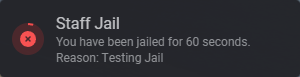
<figure><img src="/files/cywtfWjjQowJH10AKUxU" alt=""><figcaption><p>Staff Jail User Alert</p></figcaption></figure>

<figure><img src="/files/TdPM0FSdUMsjeoQdGNl8" alt=""><figcaption><p>Staff Jail Sentence Left</p></figcaption></figure>

<figure><img src="/files/yJfo6YDdMkUmz3mhfp1f" alt=""><figcaption><p>If the user attempts to escape</p></figcaption></figure>

<figure><img src="/files/cLeUNTznJEqykcTLl4A5" alt=""><figcaption><p>If Script Restarts or user re-logs</p></figcaption></figure>

<figure><img src="/files/ksydkZxREZRdF2ZBnKXc" alt=""><figcaption><p>Discord Logging Preview</p></figcaption></figure>

***

```lua
local NotifyType = "Ox_lib"           -- Change to: "Ox_lib", "OkOkNotify", "EasyAdmin", "GTA", "Mythic"
local notifyTime = 5000
local notifyPosition = 'center-right' -- only for Ox_lib

local minSentenceLength = 60     -- Minimum sentence length in seconds
local maxSentenceLength = 800    -- Maximum sentence length in seconds

-- Jail location (center point of the zone) - used for permanent debug zone
local sentenceLocation = vector4(1690.46, 2560.29, 45.56, 255.75)

-- Release location
local sentenceEndlocation = vector4(1848.69, 2585.56, 45.67, 268.58)

-- Anti-escape zone settings
local jailZoneRadius = 145.0                -- Max allowed distance from center
local escapePenaltySeconds = 30             -- Time added per escape attempt

-- Permanent debug zone (always visible for coverage checking)
local AlwaysShowPermanentDebugZone = true   -- Set to false when you're done tuning
local remainingUpdateInterval = 5000        -- Report remaining time every 5 seconds
```

{% hint style="success" %}
Downloads

\[PAID | Open Source] [Official Store Link](https://arcticdevlabs.com/package/script?script=EA-Staff-Jail)
{% endhint %}



---

# Agent Instructions
This documentation is published with GitBook. GitBook is the documentation platform designed so that both humans and AI agents can read, navigate, and reason over technical content effectively. Learn more at gitbook.com.

## Querying This Documentation
If you need additional information that is not directly available in this page, you can query the documentation dynamically by asking a question.

Perform an HTTP GET request on the current page URL with the `ask` query parameter, and the optional `goal` query parameter:

```
GET https://arctic-development.gitbook.io/arctic-development/easyadmin-plugins/ea-or-staff-jail.md?ask=<question>&goal=<endgoal>
```

`ask` is the immediate question: it should be specific, self-contained, and written in natural language.
`goal` is optional and describes the broader end goal you are ultimately trying to accomplish on behalf of the user. GitBook uses it to tailor the answer towards what is most useful for that goal.

The response will contain a direct answer to the question and relevant excerpts and sources from the documentation.

Use this mechanism when the answer is not explicitly present in the current page, you need clarification or additional context, or you want to retrieve related documentation sections.